Digital art has transformed the way creators express themselves. Whether you’re sketching, painting, animating, or designing, the right drawing tablet can make the difference between frustration and fluid creativity. Tablets today combine precision styluses, responsive screens, and powerful software integration to give artists tools that rival traditional media.
What Is a Drawing Tablet?
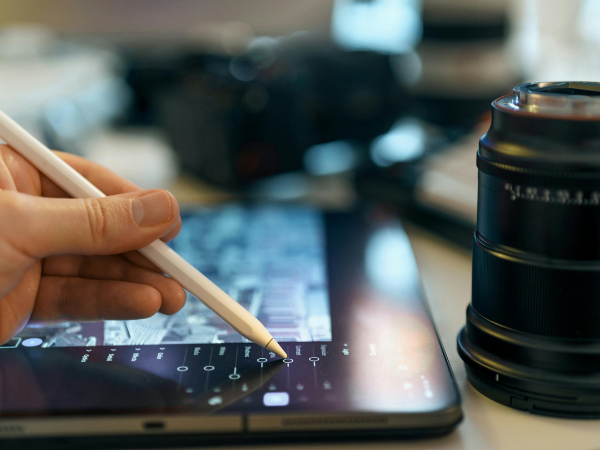
A drawing tablet is a digital device that allows artists to create directly on a screen or surface using a stylus. Unlike a mouse, a stylus mimics the natural motion of a pen or brush, offering pressure sensitivity and tilt recognition.
Core features of drawing tablets include:
- Pressure sensitivity for nuanced strokes.
- Stylus tilt recognition for shading.
- High-resolution displays for clarity.
- Compatibility with creative software like Photoshop, Illustrator, and Procreate.
- Ergonomic design for long sessions.
Together, these features make drawing tablets indispensable for modern artists. They bridge the gap between traditional sketching and digital workflows, offering flexibility and precision.
Best Overall Drawing Tablets in 2025
The market is full of options, but some stand out as the best overall performers.
Top picks for 2025:
- Xencelabs Pen Display 16 – praised for its natural drawing feel.
- XPPen Artist Pro 16 (Gen 2) – excellent stylus performance.
- Wacom MovinkPad Pro 14 – portable yet powerful.
- Apple iPad Pro (M4 chip) – versatile for both art and general use.
- Huion Kamvas Pro 24 – large screen for detailed work.
These tablets balance performance, price, and usability. They are suitable for both professionals and serious hobbyists who want reliable tools.
Best Tablets for Beginners
Not every artist needs a professional-grade device. Beginners benefit from affordable, user-friendly tablets.
Recommended beginner tablets:
- Wacom Intuos Pro Small – compact and intuitive.
- Huion Inspiroy H640P – budget-friendly with solid performance.
- XP-Pen Deco 01 V2 – large active area at a low price.
- iPad (standard model) – versatile entry-level option.
These tablets help new artists learn digital techniques without overwhelming them. They provide enough functionality to grow skills while keeping costs manageable.
Professional Tablets for Advanced Artists
Professional artists need tablets that can handle complex projects, from animation to 3D modeling.
Best professional options:
- Wacom Cintiq Pro 27 – industry standard for illustrators.
- Huion Kamvas Pro 24 (4K) – high-resolution display for detail.
- Apple iPad Pro with Pencil (M4) – unmatched portability and app ecosystem.
- Xencelabs Pen Display 24 – ergonomic design for long sessions.
These tablets are investments, but they deliver unmatched precision and durability. Professionals rely on them for client work, studio projects, and commercial art.
Portable Drawing Tablets
Artists often need mobility. Portable tablets allow creativity anywhere.
Best portable picks:
- iPad Pro (11-inch) – lightweight and versatile.
- Wacom MovinkPad Pro 14 – slim design for travel.
- Samsung Galaxy Tab S9 Ultra – Android powerhouse.
- Microsoft Surface Pro 10 – hybrid laptop-tablet for multitasking.
Portability ensures that inspiration can be captured instantly. These devices combine performance with convenience, making them ideal for students and traveling professionals.
Latin Influence: Brands and Cultural Inspiration
While many drawing tablets come from Japanese, Chinese, or American companies, Latin culture influences design and branding in subtle ways. Coffee brands, Latin typography, and cultural motifs often inspire tablet aesthetics and marketing.
Latin-related aspects in digital art tools:
- Bold, vibrant branding reminiscent of Latin American design.
- Integration of cultural motifs in promotional art.
- Growing Latin American creative communities using tablets for illustration and design.
- Local distributors in Mexico, Brazil, and Colombia making tablets more accessible.
Latin America’s artistic heritage—muralism, vibrant color palettes, and expressive forms—continues to inspire digital artists worldwide. Tablets become tools not just for creation, but for cultural storytelling.
Key Features to Consider Before Buying
Choosing the right tablet depends on your needs.
Important features to evaluate:
- Screen size and resolution.
- Stylus responsiveness and pressure levels.
- Software compatibility.
- Connectivity (USB-C, Bluetooth, Wi-Fi).
- Price and warranty.
By weighing these factors, artists can select a tablet that matches their workflow. Beginners may prioritize affordability, while professionals focus on precision and durability.
Future Trends in Drawing Tablets
Technology continues to evolve, shaping the future of digital art.
Emerging trends:
- Foldable screens for flexible drawing.
- AI-assisted sketching tools.
- Cloud integration for collaborative projects.
- Sustainable materials and eco-friendly packaging.
- Expanded Latin American distribution networks.
These innovations will make tablets even more versatile, ensuring that digital art remains at the forefront of creative industries.
Conclusion: Choosing the Right Tablet for You
Digital art thrives when artists have the right tools. From beginner-friendly options to professional powerhouses, tablets in 2025 offer something for everyone. Latin influences enrich the global art scene, reminding us that creativity is universal. Whether you’re sketching at home, designing in a studio, or traveling with a portable device, the right tablet can unlock your full potential.