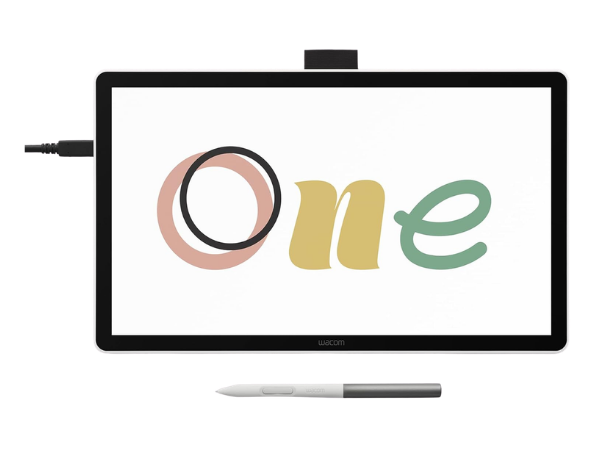
The Wacom One 14 is a modern pen display tablet designed to give artists, designers, and even remote workers a reliable creative tool. With its 14-inch laminated screen, responsive pen, and bundled creative software, it balances professional performance with accessibility.
Wacom One 14 Drawing Tablet Overview
The Wacom One 14 is built to be approachable yet powerful, offering a larger canvas than its predecessor while maintaining portability. Its laminated screen reduces parallax, and the battery-free pen ensures uninterrupted creativity.
Key Highlights:
- 14-inch laminated IPS Full HD display
- Lightweight, portable design
- Battery-free pen with natural response
- Compatible with Windows, macOS, and ChromeOS
- Starter kit with creative software and training
This overview shows why the Wacom One 14 appeals to both beginners and professionals. It’s not overloaded with features but delivers exactly what creators need: a reliable, intuitive tool that feels natural to use.
Display Quality and Color Accuracy
The display is one of the strongest aspects of the Wacom One 14. Its laminated IPS Full HD panel minimizes parallax, ensuring strokes appear exactly where the pen touches. With 98% sRGB coverage, colors are vivid and accurate.
Display Features:
- 14-inch laminated IPS Full HD panel
- 98% sRGB color accuracy
- Paper-like texture reduces glare
- Wide viewing angles
- Smooth surface for natural pen movement
This combination makes the tablet ideal for long creative sessions. Whether sketching, painting, or editing, the display ensures precision and comfort, helping artists stay immersed in their work.
Pen Performance and Pressure Sensitivity
Wacom’s pen technology is a cornerstone of its reputation, and the Wacom One 14 continues that tradition. The pen is battery-free, lightweight, and responsive, capturing subtle variations in pressure.
Pen Features:
- Battery-free design
- 4,096 levels of pressure sensitivity
- Tilt recognition for shading
- Minimal lag during strokes
- Comfortable grip for long use
This pen mimics traditional drawing tools, making it easy for beginners to adapt while offering professionals the precision they expect. It’s reliable, accurate, and comfortable for extended sessions.
Connectivity Options and Compatibility
The Wacom One 14 offers flexible connectivity, ensuring it integrates smoothly into different setups. It supports USB-C with Thunderbolt 3 and 4, plus DisplayPort Alt mode.
Connectivity Options:
- USB-C with Thunderbolt 3/4 support
- DisplayPort Alt mode compatibility
- HDMI connection with Wacom converter (ACK45219Z)
- Works with Windows 10+, macOS 13+, ChromeOS
- Plug-and-play setup
This versatility ensures the tablet works across modern laptops and desktops. Even if adapters are required, the setup remains straightforward, making it practical for diverse workflows.
Creative Software and Training Bundle
To help users get started, Wacom includes a creative starter kit with software trials and training. This adds immediate value, giving users access to professional tools.
Included Resources:
- Clip Studio Paint Pro trial
- Magma for collaborative drawing
- Concepts for sketching and design
- Foxit software for documents
- Skillshare training courses
This bundle ensures users can begin creating right away. Beginners benefit from guided learning, while professionals can explore new tools to expand their skillset.
Reliability and Everyday Performance
Reliability is a hallmark of Wacom, and the One 14 continues that tradition. It avoids common frustrations like driver issues or random disconnects.
Performance Strengths:
- Stable drivers across platforms
- Seamless integration with creative apps
- Minimal lag during drawing
- Durable build quality
- Proven Wacom reliability
This consistency makes the tablet dependable for daily use. Whether for professional projects or casual sketching, it delivers smooth performance without interruptions.
Best Uses: Animation, Drawing, and Remote Work
The Wacom One 14 is versatile, serving multiple purposes beyond art. Its responsive pen and accurate display make it suitable for animation, illustration, and design, while its compatibility with productivity tools supports remote work.
Ideal Applications:
- Animation workflows
- Digital drawing and painting
- Graphic design projects
- Remote work with document signing
- Online collaboration
This adaptability makes the Wacom One 14 more than just an art tablet—it’s a multifunctional device that supports both creativity and productivity.
Final Verdict on the Wacom One 14
The Wacom One 14 strikes a balance between accessibility and professional performance. With its laminated display, responsive pen, reliable connectivity, and bundled creative resources, it’s a strong choice for artists, designers, and remote workers.
It may not have the advanced features of Wacom’s higher-end models, but its affordability and reliability make it an excellent option for those seeking a dependable creative tool. For anyone looking to explore digital art or enhance their workflow, the Wacom One 14 delivers a well-rounded experience.