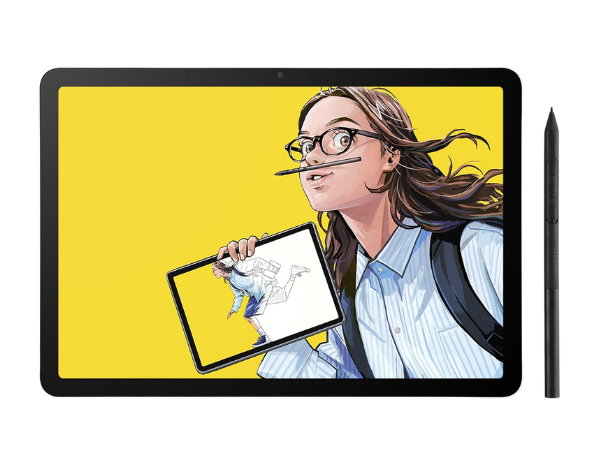
The Wacom MovinkPad 11 is a breakthrough in mobile creativity, offering artists a true sketchbook‑like experience in digital form. Unlike traditional tablets that require a computer or external setup, this all‑in‑one device runs on Android 14, making it a standalone powerhouse for drawing, animation, and writing.
All‑in‑One Android Drawing Tablet Design
The MovinkPad 11 is designed as a complete creative workstation in a single device. Artists no longer need to tether to a PC or install extra drivers—the tablet itself is the canvas. Its
Key design highlights:
- Standalone Functionality – No computer required for drawing or animation.
- Anti‑Glare Etched Glass – Paper‑like texture for natural sketching.
- Slim Pro Pen 3 – Battery‑free, lightweight, and precise.
- Pre‑Installed Apps – Wacom Canvas and Clip Studio Paint Debut included.
- Compact Build – Fits easily into backpacks for mobile use.
This all‑in‑one design makes the MovinkPad 11 ideal for both beginners and professionals. It’s a digital sketchbook that’s always ready, combining hardware and software into one seamless package.
Quick Draw Feature for Instant Creativity
One of the standout features of the MovinkPad 11 is its Quick Draw function. By simply tapping and holding the pen on the screen, Wacom Canvas launches instantly, allowing artists to sketch without delay.
Quick Draw advantages:
- Instant Launch – Start sketching in seconds.
- Seamless Workflow – Transition easily to other apps for refinement.
- Natural Experience – Mimics flipping open a notebook.
- Reduced Barriers – Encourages spontaneous creativity.
- Integrated with Wacom Canvas – Optimized for sketching and ideation.
This feature is particularly valuable for artists who thrive on capturing ideas quickly. Whether doodling between classes or refining professional concepts, Quick Draw ensures inspiration is never lost to technical delays.
Best‑in‑Class Slim Pro Pen 3 Performance
The MovinkPad 11 ships with a slim version of Wacom’s Pro Pen 3, engineered for precision and comfort. Unlike many styluses, it’s battery‑free, lightweight, and designed with three programmable buttons for enhanced control. Replacement nibs are stored in the pen’s back end, ensuring longevity.
Pro Pen 3 highlights:
- 8192 Pressure Levels – Ultra‑sensitive for nuanced strokes.
- Battery‑Free Design – No charging required.
- Slim Barrel – Comfortable grip for long sessions.
- Programmable Buttons – Custom shortcuts for efficiency.
- Nib Storage – Built‑in replacements for convenience.
This pen elevates the MovinkPad 11 beyond casual tablets, offering professional‑grade responsiveness. It’s ideal for detailed illustration, animation, and digital painting, making it one of the strongest assets of the device.
8192 Levels of Pressure Sensitivity Explained
Pressure sensitivity defines how well a tablet translates pen pressure into line variation. With 8192 levels, the MovinkPad 11 offers exceptional control, allowing artists to create faint sketches or bold strokes with natural fluidity. This level of precision is critical for shading, calligraphy, and expressive line work.
Benefits of 8192 levels:
- Fine Detail Control – Capture subtle variations in pressure.
- Natural Shading – Smooth gradients and textures.
- Expressive Line Work – From delicate strokes to bold outlines.
- Professional Standard – Matches industry expectations for digital art.
- Enhanced Workflow – Reduces reliance on manual adjustments.
This sensitivity ensures that the MovinkPad 11 feels closer to traditional media, bridging the gap between digital and analog artistry.
Portable and Lightweight Tablet for Artists
Weighing just 1.3 lbs, the MovinkPad 11 is lighter than most laptops, making it a true mobile sketchbook. Its slim profile fits easily into bags, and it supports popular third‑party pens like Dr. Grip, LAMY, and STAEDTLER. This portability makes it ideal for students, traveling artists, and professionals who want creativity on the go.
Portability highlights:
- Lightweight Build – Easy to carry anywhere.
- Slim Profile – Fits into backpacks or messenger bags.
- Third‑Party Pen Support – Expands usability.
- Durable Design – Built for daily travel.
- Sketchbook Alternative – Digital creativity wherever you are.
This mobility ensures that inspiration isn’t confined to the studio. The MovinkPad 11 empowers artists to sketch in cafés, classrooms, or outdoor settings with ease.
Anti‑Glare Etched Glass Matte Screen Benefits
The MovinkPad 11’s anti‑glare etched glass screen is one of its most praised features. It reduces reflections, mimics the feel of paper, and enhances precision. Artists often struggle with glossy screens that cause eye strain or slippery pen movement—this matte surface solves both issues.
Screen benefits:
- Paper‑Like Texture – Natural drawing feel.
- Reduced Glare – Comfortable for long sessions.
- Improved Precision – Pen traction enhances control.
- Eye Comfort – Less strain during extended use.
- Professional Finish – Matches high‑end drawing standards.
This screen design makes the MovinkPad 11 stand out among competitors, offering a tactile experience that bridges traditional sketching with digital innovation.
Wacom Shelf: Organize Sketches and Artwork
The Wacom Shelf is a built‑in organizational tool that helps artists manage their digital creations. It supports major image formats and allows quick access to sketches, references, and finished artwork.
Wacom Shelf features:
- Centralized Storage – Keep all artwork in one place.
- Format Support – Works with popular image types.
- Quick Access – Find files at a glance.
- Reference Integration – Store inspiration alongside projects.
- Streamlined Workflow – Reduces clutter and saves time.
This feature transforms the MovinkPad 11 into more than just a drawing tablet—it becomes a creative hub, helping artists stay organized and efficient.
Performance Specs: RAM, Storage, and OS
Under the hood, the MovinkPad 11 runs Android 14, with 8GB RAM and 128GB storage. This ensures smooth multitasking and enough space for large projects. While it lacks a microSD slot, cloud storage integration helps offset this limitation.
Performance highlights:
- Android 14 OS – Modern, stable, and app‑friendly.
- 8GB RAM – Handles multitasking and creative apps.
- 128GB Storage – Ample space for projects.
- Cloud Integration – Expand storage via online platforms.
- Efficient Hardware – Balanced for portability and power.
These specs make the MovinkPad 11 capable of handling most creative workflows, though extremely large canvases with many layers may experience lag.
Who Should Buy the Wacom MovinkPad 11?
The MovinkPad 11 is best suited for digital artists, illustrators, and students who want a portable, professional‑grade drawing tablet. It’s ideal for those who value immediacy, thanks to Quick Draw, and for anyone seeking a sketchbook‑like digital experience.
Best suited for:
- Students – Lightweight and easy to carry.
- Illustrators – Precision pen and pressure sensitivity.
- Animators – Smooth workflow with Clip Studio Paint.
- Casual Artists – Quick Draw for spontaneous sketching.
- Professionals – Portable alternative to studio setups.
For anyone who wants a dedicated drawing device without the distractions of entertainment tablets, the Wacom MovinkPad 11 is a compelling choice.